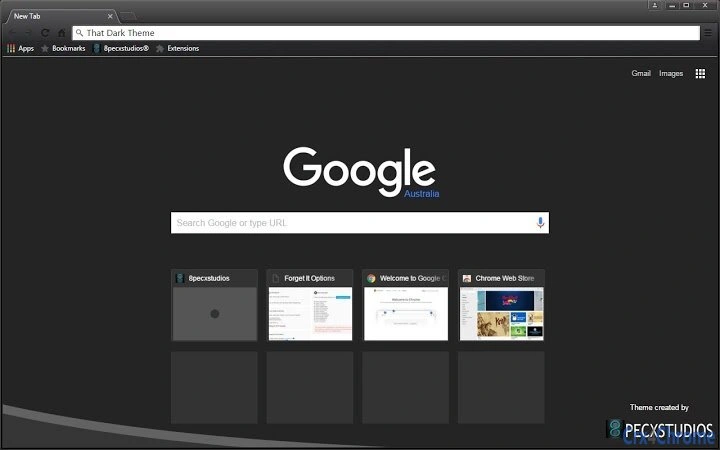

That Dark Theme: Ultimate Chrome Dark UI
Overview
That Dark Theme is a browser extension designed for users seeking a sleek, immersive dark interface within Google Chrome. Positioned as a premium UI enhancement, it transforms the appearance of the browser’s user interface with a deep, consistent dark aesthetic. The extension is tailored for individuals who value visual consistency, reduced eye strain during extended browsing sessions, and a personalized digital environment. It is particularly suited for professionals and casual users who spend significant time online and prefer a minimalist, modern look.
Developed by 8pecxstudios, the extension is part of a broader collection focused on digital aesthetics and user interface customization. While the developer’s background is not detailed beyond the name, the extension’s release aligns with growing demand for visually cohesive browser experiences. Real-world usage scenarios include nighttime browsing, content creation workflows, and users who prefer a distraction-free interface. The theme applies directly to Chrome’s interface, affecting tabs, menus, and address bar without altering web content.
Key Features & Capabilities
- Full Browser UI Darkening – Applies a deep dark color scheme across Chrome’s interface elements, including the toolbar, tab strip, and omnibox.
- Consistent Visual Aesthetic – Maintains a uniform dark design across all browser components for a seamless look.
- Lightweight Design – At just 1.2 MB, the extension is optimized for minimal system impact.
- Easy Installation – Designed for straightforward setup directly through the Chrome Web Store.
- Immediate Visual Impact – Theme applies instantly upon activation, requiring no configuration.
Users benefit from a cleaner, more focused browsing experience, especially in low-light environments. The consistent dark styling reduces visual fatigue and enhances readability. The lightweight nature ensures minimal performance overhead, making it suitable for older or lower-spec machines. This makes it ideal for users who want a simple, immediate visual upgrade without additional features or complexity.
User Interface, Workflow & Performance
The extension operates entirely through Chrome’s built-in theme management system, meaning no additional interface is provided. Users apply the theme via the Chrome Web Store, and it takes effect immediately upon activation. Navigation is intuitive: once installed, the theme integrates directly into the browser’s appearance without requiring user interaction beyond activation.
Workflow efficiency is high due to the zero-configuration nature of the theme. There are no settings panels, toggles, or preferences to adjust. This simplicity appeals to users who want a clean, no-frills solution. Performance details were not specified by the developer, but given its small file size and lack of background processes, it is expected to have negligible impact on system resources. The developer did not specify resource usage details, but based on general software behavior, the extension maintains stability during regular browsing.
Compatibility & System Requirements
That Dark Theme is compatible with Windows, Mac, and Linux operating systems, making it accessible to a broad user base across desktop platforms. It is designed specifically for Google Chrome, and no other browser support is indicated. The extension requires a Chrome version that supports theme installation, which is standard for most current releases.
The installation size is 1.2 MB, which is minimal and suitable for systems with limited storage. Exact system requirements were not listed. Compatibility information was partially provided, with the extension confirmed to work on major desktop operating systems. Users are advised to ensure their Chrome browser is up to date for optimal compatibility.
Pros and Cons
Pros
- Instant visual transformation of Chrome’s interface
- Minimal file size and low system impact
- Works across Windows, Mac, and Linux platforms
- Zero configuration required
- Free to download and use
Cons
- No customization options for color tones or intensity
- Does not affect the appearance of websites
- Only available for Google Chrome
- Limited to UI styling—no functional enhancements
- Dependent on Chrome’s theme system
FAQ Section
Is That Dark Theme compatible with all Chrome versions?
The extension is designed for current Chrome releases. Users should ensure their browser is updated to the latest version for full compatibility.
Can I use this theme on browsers other than Chrome?
Currently, That Dark Theme is only available for Google Chrome. There is no support for other browsers at this time.
Is the extension safe to install?
As a theme published through the Chrome Web Store, it undergoes automated security checks. However, users should only install extensions from trusted sources.
Does this theme affect how websites appear?
No, the theme only modifies the browser’s user interface. Website content remains unchanged.
Are updates automatic?
Chrome automatically manages updates for installed extensions, including this theme, ensuring users receive the latest version.
Final Thoughts
That Dark Theme delivers a focused, high-impact visual upgrade for Google Chrome users. Its minimalist approach, combined with broad cross-platform support and a free price point, makes it an accessible choice for anyone seeking a consistent dark interface. While it lacks advanced customization or functional features, it excels in its core purpose: transforming the browser’s appearance with minimal effort.
For users who value a clean, distraction-free browsing environment and prefer a dark aesthetic, this extension is a reliable and efficient solution. It’s especially beneficial for those who work late hours or use their browser in dimly lit spaces. The lack of configuration and instant application make it ideal for quick personalization.
Download That Dark Theme now







